The world’s largest project cargo and breakbulk event

Official Show App

Image

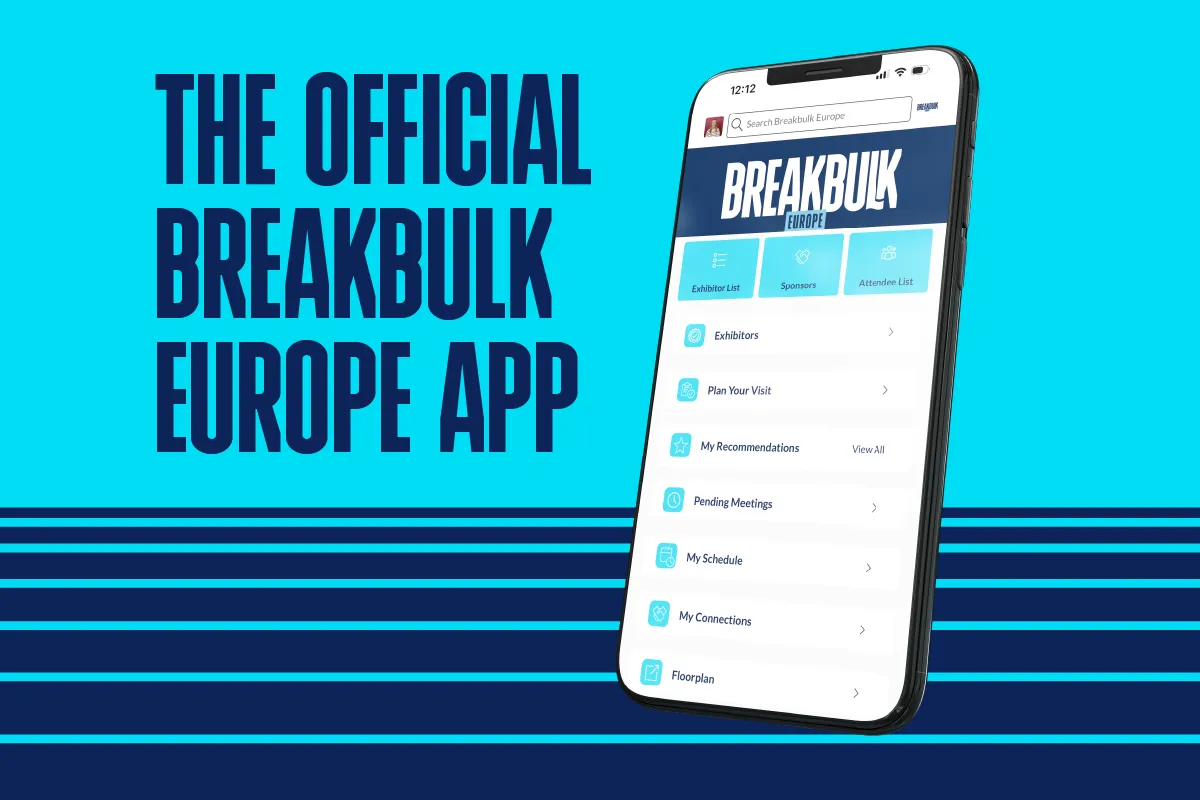
The easiest way to navigate the event and network!


Watch the demos, get instructions on how to login and download the app.Turn on notifications for exclusive updates and important show information!

Available to download from the App Store or Google Play Store, just search 'Breakbulk Events'.

Sponsored by

How to log in

If you are a new visitor, log in with the same email address you registered with, and the password is sent to you in an email from [email protected].

For technical assistance, please email:
[email protected]
 

The Breakbulk Europe app includes:

  • The full exhibitor list
  • Event agenda, speaker, and partners list
  • View the full attendee list
  • Interactive Show Floorplan
  • Networking recommendations generated by an intelligent matchmaking algorithm
  • Editable personal schedule
  • Managing your company in the ‘My Team’ section (exhibitors only)
  • Plus other features - Download it now to find out more

Tutorials for how to use the app

For visitors

For exhibitors

Accessing your account

1. Once registered, you will receive an email from [email protected]

2. Follow the steps in the email to login and start networking!

3. If you have any trouble logging in please contact [email protected]

Respond

Connections and Meetings are the core elements of a successful event experience.

1. Request: Get recommendations, search and scroll through lists to request meetings.

2. Respond: Receive incoming meeting requests via notifications or email and accept them to sync you’re your personal calendar.

3. Meet at the show: Attend the pre scheduled meeting and be on time

4. Rate: Give anonymous feedback on your meeting with ‘Good’, ‘Bad’ etc.

Event Agenda/My Schedule


Easily keep track of the sessions you want to attend by using the bottom screen navigation to select Schedule. Start with the Event Agenda tab and tap the calendar icon next to a session to add it to your schedule. Switch to My Schedule tab to view your itinerary.
View agenda

Once your registration is confirmed, you will receive an email from Grip on behalf of Breakbulk Europe. This will contain your Login Credentials.

Frequently Asked Questions

The Breakbulk App includes: 

  • Event agenda & sessions 

  • Exhibitor directory & Floor Plan 

  • Meeting tools 

  • Attendee profiles

  • Search & filters 

Once you are in the App: 

  • Use filters to find people, companies, or products. 

  • Contact exhibitors, add to your “Interested” list, and request meetings. 


Interaction Rules: 
Visitors can browse exhibitor profiles only. Exhibitors have access to both exhibitor and visitor profiles. Viewing the full visitor list in the app is an exclusive benefit available to exhibiting companies. 

Option 1: Receive Your Login Details: 

After completing registration, you’ll receive a separate email with your login credentials (registration email + temporary password). 

Temporary password: This is your one-time access code. Use it to log in for the first time and create your own secure password. 

 Option 2: Login with Your Registration Email 

Enter the same email address used during registration. 

If the system does not recognise your password, use your temporary password to access your account. 

You will then be prompted to create a new personal password for future access. 

 Forgot Your Password? 

You can request a password reset link anytime. 
 

To access the App via the web:

  • You’ll receive an email with a link to the web version of the app.

  • Bookmark it on your desktop for quick access.

  • The web version includes short tutorial videos and useful guides.

Export Connections (through the web version only): Click your user icon → Export Choose to export Meetings or Connections

Default is that details won't be shown however users have the option to update their contact details to connections only or public under 'edit your profile'.

Contact-Details-BBEU24.png

Yes!  You can export connections on the web platform only (toggle to user icon on web, click on export, there is then an option to export meetings or connections) 

Ensure that you’re registered to Breakbulk Europe 2025 and update the app and devise software. Reach out to [email protected] if the problem persists.

Yes, meetings will sync to your calendar, and any changes to meetings or sessions will automatically appear. For instance, if a meeting status changes or a sponsor is added to a session, the update will be reflected in your calendar. However, please note that the time it takes for these changes to appear may vary depending on the calendar you're using.
To maintain the quality of networking and ensure meaningful engagements, Breakbulk limits the number of pending meeting requests that can be sent via the app:
 
  • Shippers: Up to 30
  • Exhibitor representatives: Up to 20
  • General attendees: Up to 10

These limits are in place to:
 
  • Prevent mass spamming of attendees
  • Encourage targeted and thoughtful outreach
  • Improve response rates and attendee satisfaction

Once pending meetings are either accepted or cancelled, new requests can be made. We also encourage all users to:
 
  • Use the chat tool to follow up with contacts
  • Cancel unresponsive pending requests after a few days
  • Take advantage of on-site networking opportunities, which remain a core part of the Breakbulk experience